



Rules for Operating an X-ray Crystal Orientation Instrument
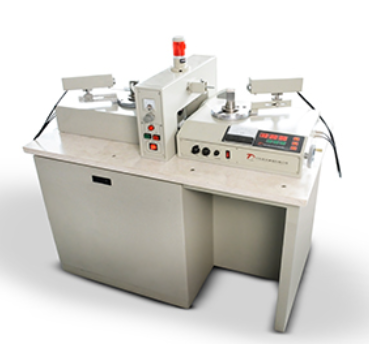
2026-03-23 09:46The X-ray crystal orientation instrument is an important piece of equipment that utilizes the principle of X-ray diffraction for structural analysis of crystalline materials. It is widely used in materials science, physics, chemistry, and other fields to determine crystal orientation, lattice constants, defects, and other properties. To ensure the accuracy of experimental results and the service life of the instrument, operators must pay attention to the following details when using the X-ray crystal orientation instrument:
I. Safety Protection
Personal Protective Equipment
Wear Protective Clothing: Operators should wear standard-compliant protective clothing to reduce radiation exposure to the body.
Wear Protective Glasses: Protect the eyes from X-ray radiation.
Use Protective Screens: Set up protective screens around the instrument to prevent X-ray leakage.
Laboratory Safety
Restrict Access: Unauthorized personnel must not enter the laboratory to avoid unnecessary radiation exposure.
Warning Signs: Post clear radiation warning signs at the laboratory entrance and near the instrument.
Emergency Stop Device: Ensure the emergency stop device is functional to quickly cut off power in case of an accident.
II. Instrument Installation and Calibration
Installation Environment
Stable Work Surface: Install the instrument on a stable workbench to avoid vibrations that could affect measurement accuracy.
Dry and Ventilated: Keep the laboratory dry and well-ventilated to prevent damage to the instrument from humid environments.
Instrument Calibration
Regular Calibration: Perform regular calibration according to the manufacturer's recommendations to ensure instrument accuracy.
Standard Samples: Use standard samples with known structures and orientations for calibration to verify instrument performance.
Software Updates: Regularly check and update the instrument control software to enhance system stability and functionality.
III. Sample Preparation
Sample Selection
Representative Samples: Select representative samples for testing to ensure result reliability.
Clean Samples: Ensure the sample surface is clean and free of contaminants to avoid instrument contamination or measurement inaccuracies.
Sample Mounting
Specialized Fixtures: Use specialized fixtures to secure the sample, ensuring it remains stable during measurement.
Avoid Stress Concentration: Minimize stress concentration when securing the sample to prevent deformation or breakage.
Mark Orientation: Appropriately mark the sample to ensure consistent measurement orientation each time.
IV. Operating Procedure
Power-On and Warm-Up
Warm-Up Time: Allow sufficient warm-up time as required by the manufacturer to ensure the instrument reaches optimal working condition.
Check Indicator Lights: Confirm all indicator lights are functioning normally, signaling the instrument is ready for measurement.
Parameter Setting
Scan Range: Select an appropriate scan range based on sample characteristics, avoiding exceeding the instrument's detection limits.
Step Speed: Set a reasonable step speed to balance measurement precision and time efficiency.
Data Acquisition Mode: Choose the appropriate data acquisition mode, such as continuous scan or point scan.
Measurement Process
Avoid Interference: Minimize external interference during measurement, such as turning off mobile phones and other electronic devices.
Real-Time Monitoring: Monitor measurement progress and data quality in real-time through the software interface.
Repeat Measurements: Perform multiple measurements for critical data and average the results to improve reliability.
Data Recording and Analysis
Save Raw Data: Save raw data to a designated location for subsequent analysis and traceability.
Data Processing Software: Use professional data processing software for analysis to extract useful information.
Result Comparison: Compare measurement results with theoretical values or other experimental results to verify accuracy.
V. Maintenance
Routine Maintenance
Clean the Instrument: Regularly wipe the instrument surface with a soft cloth to remove dust and dirt.
Check Cable Connections: Ensure all cable connections are secure and reliable to avoid signal loss due to looseness.
Replace Consumables: Promptly replace aging or damaged parts, such as bulbs and filters.
Long-Term Care
Professional Repair: Contact qualified service personnel for complex malfunctions.
Regular Training: Participate in training courses provided by the manufacturer to stay updated on the latest operating techniques and precautions.
Maintenance Log: Keep a maintenance log, recording the date, details, and outcomes of each maintenance activity.